✓ Desktop application for macOS & Windows · runs on your own machine

Answer due diligence questionnaires in hours, not days.

DDQ Assistant drafts every answer from your firm's own approved responses and fund documents, shows you how confident it is and where each answer came from — and your documents never leave your computer.

macOS and Windows · 30 days free · your documents never leave your machine
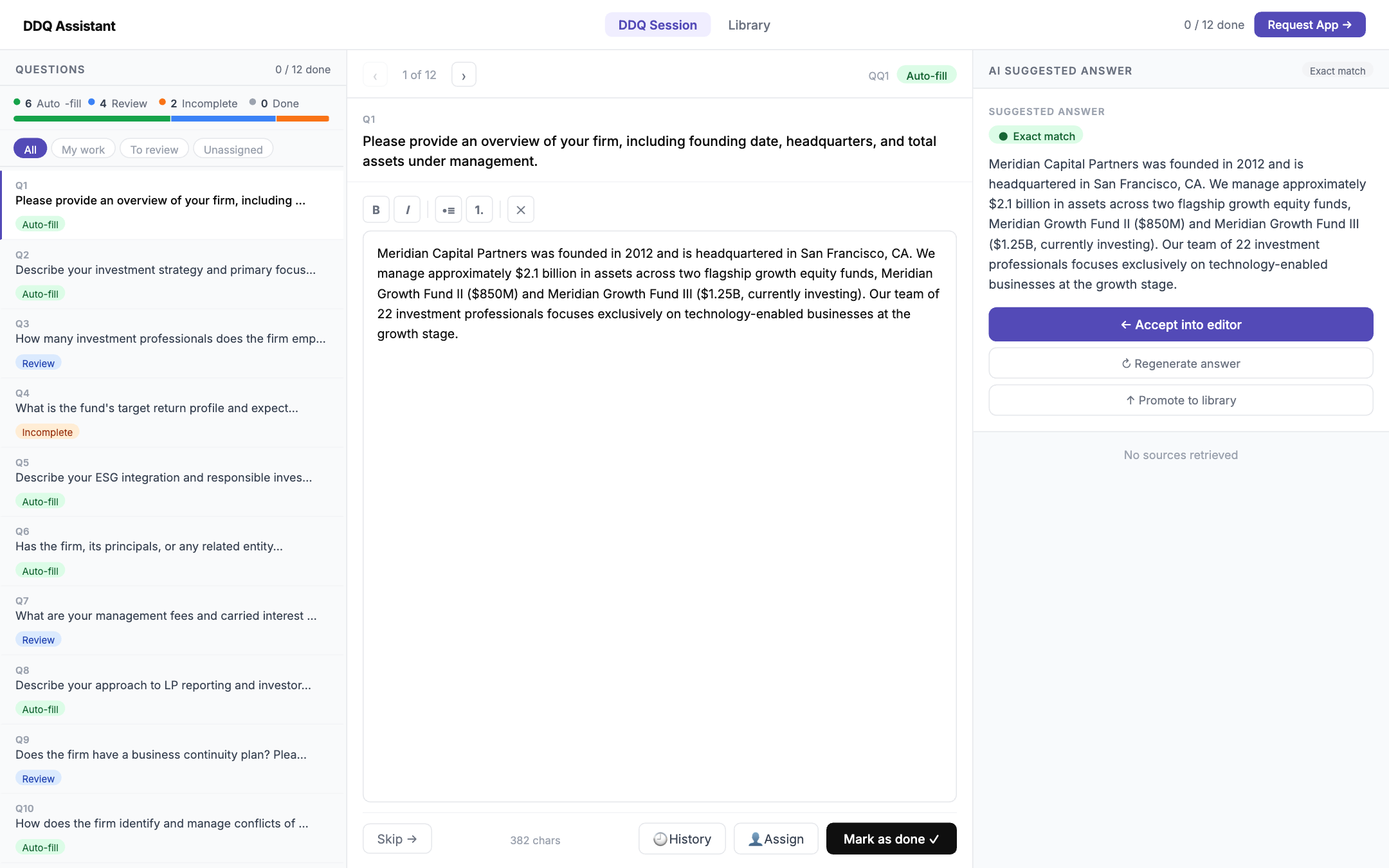
DDQ Assistant — Meridian Capital Partners (demo data)
DDQ Assistant review workspace: question list on the left, answer editor in the centre, AI-suggested answer with confidence level on the right
Local-first by designLibrary, search index and answers stay on your machine
Word, Excel & PDFReads the investor's file and fills it back in the original format
Every answer traced to a sourceConfidence level and supporting passages on each question
Built for teamsAssign questions, review, approve — with a tamper-evident audit trail
How it works

From setup to a finished questionnaire in four steps.

You stay in the driver's seat throughout. Nothing is sent to an investor until a person has reviewed and approved it.

1

Build your library

Add past questionnaires, policies, LPA, pitchbook and fund documents. This becomes the app's private memory — set up once, reused across every DDQ.

2

Add a new DDQ

Drop in the investor's questionnaire as received. The app reads out every question, including multi-page tables.

DOCXXLSXPDF
3

Get drafted answers

Each question gets a suggested answer, a confidence level, and the exact sources it was built from. Repeat questions reuse your approved wording verbatim.

4

Review & export

Edit anything, assign questions to colleagues, approve — then export back into the investor's original file format.

The product

A review workspace built for the way DDQs actually get done.

Everything you see below runs from the desktop application on your own computer or server. Screens show demo data.

Work through a DDQ question by question

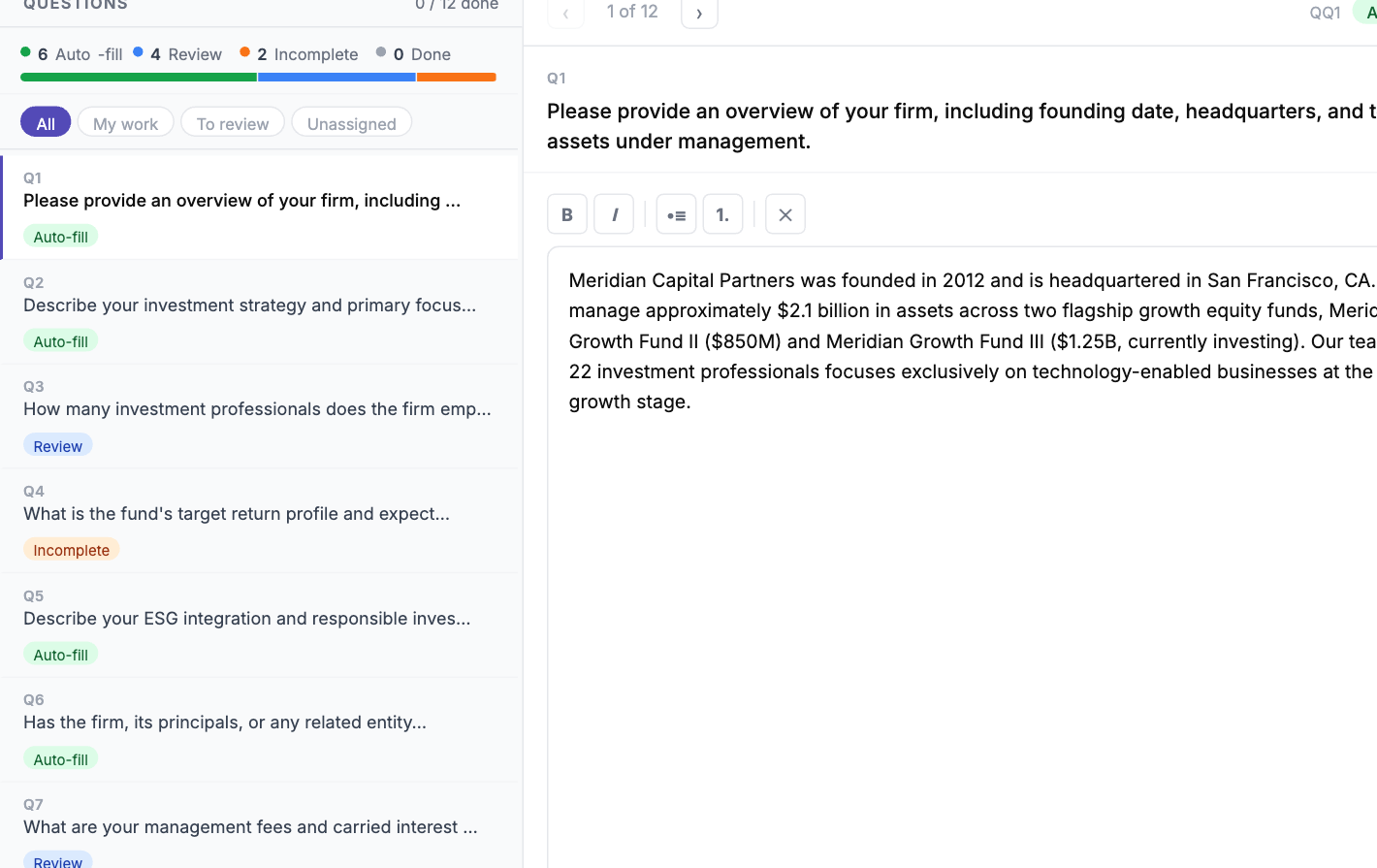
Questions are extracted and triaged automatically: auto-filled from your library, generated for review, or flagged as incomplete when your documents don't cover the point.

  • Auto-fill — exact matches to approved answers are reused word for word.
  • Review — new phrasing is drafted from your sources and marked for a human check.
  • Incomplete — gaps are flagged honestly instead of invented.
  • Accept into the editor, regenerate, or promote a polished answer to the library in one click.
DDQ session view with Auto-fill, Review and Incomplete tags on each question

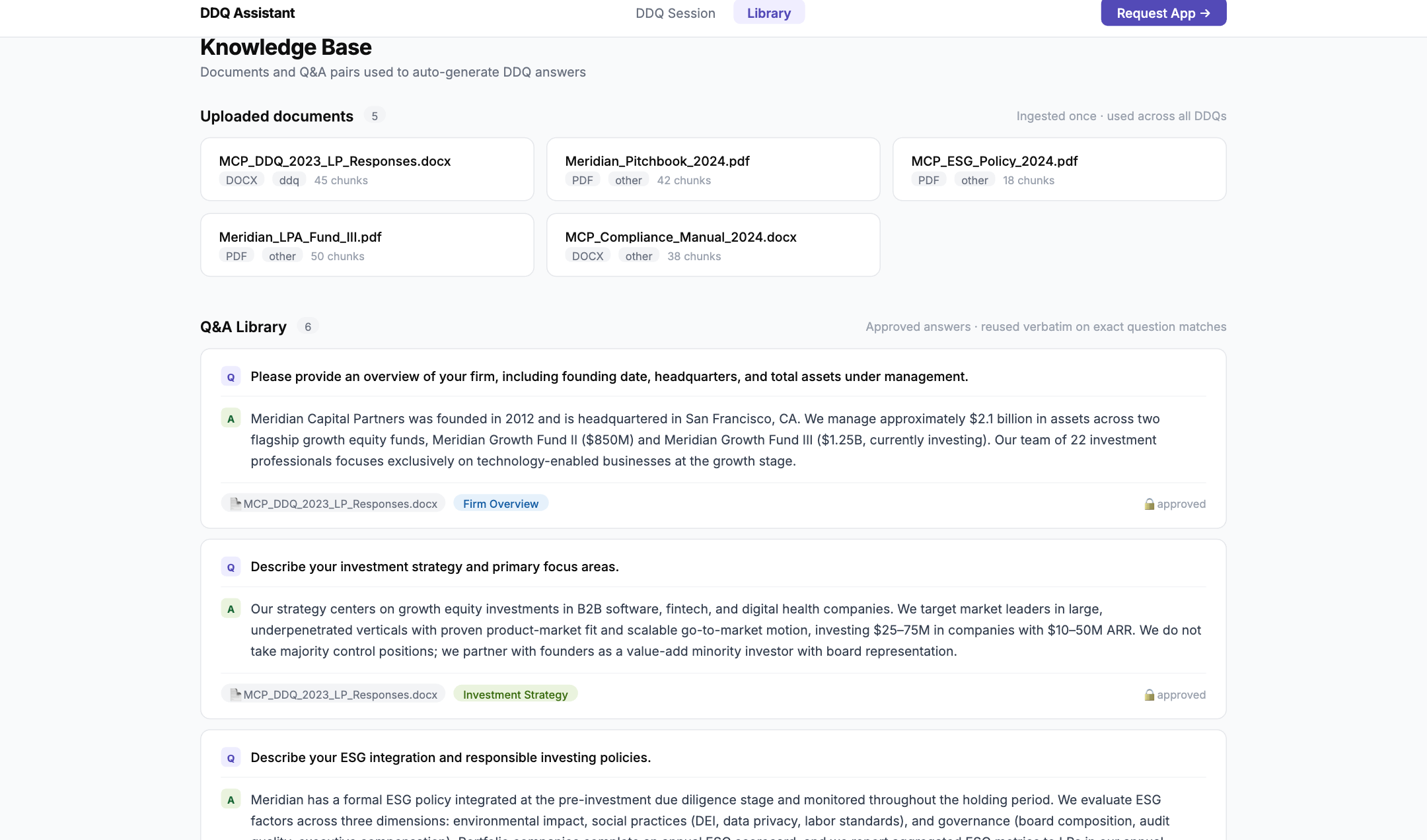
One private library for every answer you've ever approved

Upload past DDQ responses, prospectus and supplements, policies and the LPA once. The app indexes them locally and keeps a categorised Q&A library that grows with every questionnaire you complete.

  • Documents ingested once, used across all DDQs and all funds.
  • Approved answers are categorised (firm overview, strategy, ESG, fees…) and searchable.
  • Per-fund documents stay scoped to the right fund; shared answers apply firm-wide.
  • Every edit is versioned — earlier wording can always be restored.
Knowledge Base view: uploaded documents and the approved Q&A library

Grounded in your own words — never invented

The app does not make things up. Each draft is built only from your past responses and materials, and shows you the passages it relied on, so you can trust what you see before you send it.

  • A confidence level on every question — high-confidence answers are ready to send; lower ones are flagged for a closer look.
  • Sources with supporting quotes — see the exact document and passage behind each statement.
  • Consistent by default — the same vetted wording is reused across investors, so answers stay aligned over time.
Example · ACME Fund II
“Describe your firm's approach to conflicts of interest.”
High confidence

The firm maintains a documented conflicts-of-interest policy, reviewed annually by the compliance function and overseen by the Limited Partner Advisory Committee. Material conflicts require prior LPAC consent as set out in the LPA…

Q3 2025 Capstone DDQ — Q14 92% match
“…reviewed annually by the compliance function and overseen by the LPAC.”
ACME Fund II LPA — §9.3 78% match
Illustration — fictional fund and documents
Team workflow

Made for the way IR, compliance and partners work together

Assign & review

Route each question to an owner and a reviewer with due dates. Track open → in progress → pending review → approved.

Version history

Every edit to every answer is kept. Compare, restore, and see who changed what and when.

Tamper-evident audit trail

Answers, edits and approvals are recorded in an append-only log — nothing can be quietly altered after the fact.

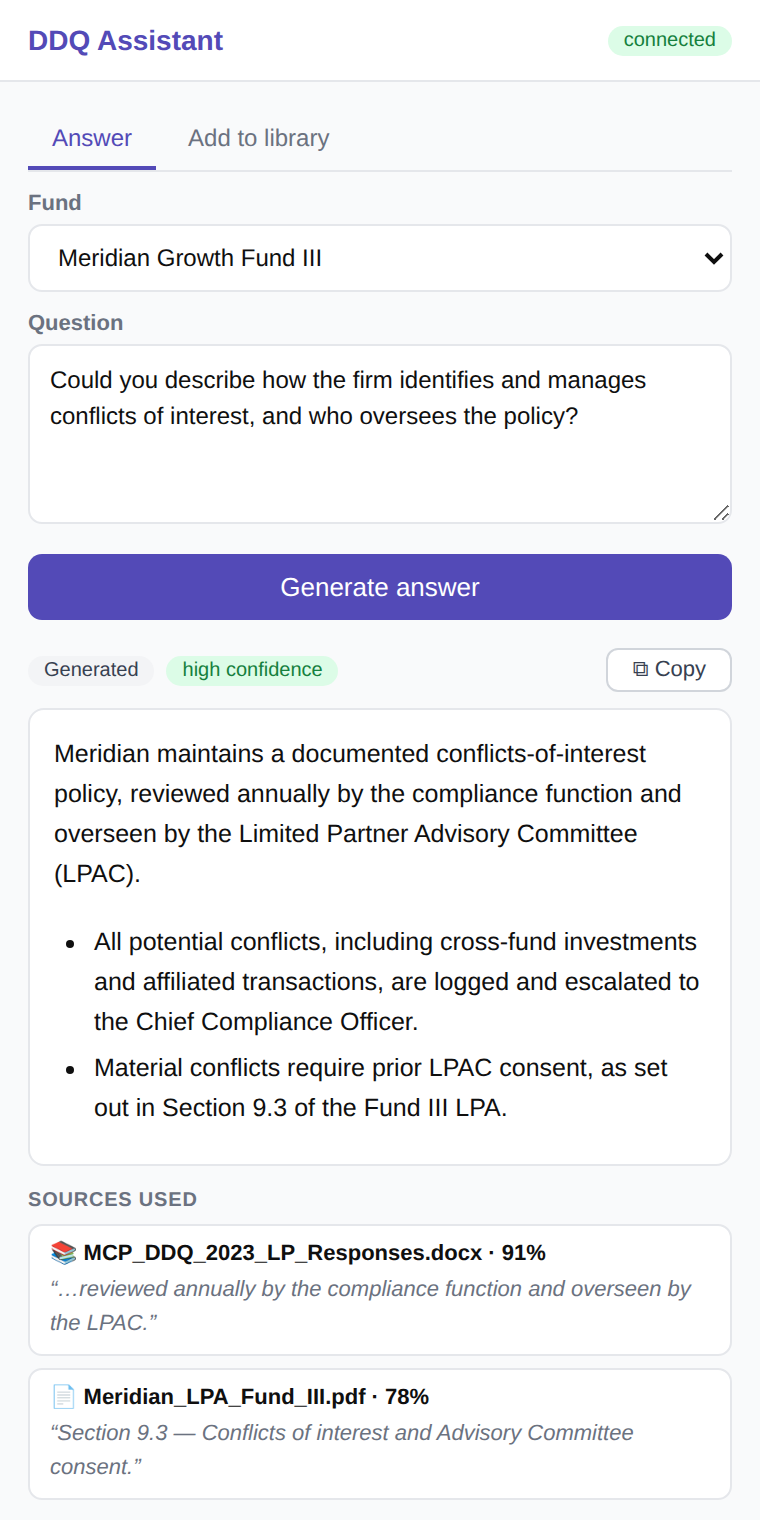
Chrome side panelDDQ Assistant
DDQ Assistant Chrome extension side panel showing a generated answer with confidence level and sources
Chrome extension

A companion for your inbox

Not every question arrives as a full questionnaire. The Chrome extension handles the one-offs from Gmail, Outlook on the web or any investor portal — without leaving your browser.

  • 1
    Answer a single question in placeSelect the investor's question, right-click, “Answer with DDQ Assistant”. A grounded draft appears in the side panel with its confidence level and sources.
  • 2
    Backed by the same private libraryIt draws on your approved answers and fund documents, so a quick reply stays consistent with your formal DDQ responses.
  • 3
    Save good replies backWrote a strong answer in an email? Select it and save it to the library — categorised, indexed and ready the next time it is asked.

The extension talks only to the DDQ Assistant application running on your own computer. No analytics, no trackers, nothing sent to third parties.

Security & privacy

Your data never leaves your desk.

This is the reason the app can touch sensitive fund material at all. It was designed for compliance teams first.

Runs on your own machine

The application, your library, the search index and all answers live locally on your computer or server. There is no shared cloud database of client documents.

Raw documents are never uploaded

Your questionnaires and files stay on your machine. They are never sent to us or to any third party — the only outbound connection is the AI model API.

Identifying details removed first

When AI is used to phrase an answer, names and identifying details are stripped by a local anonymisation gate before any text is sent — and restored afterwards.

Works offline

Search, review, edit and export need no internet connection. Embeddings and reranking run locally with bundled models — nothing is downloaded at runtime.

Complete, tamper-evident audit trail

Every answer, edit and approval is recorded in an append-only log. Library changes are snapshotted before any modification.

IT-friendly deployment

Installs like any desktop application on macOS or Windows, or on a shared server for a team. A single outbound endpoint for your IT team to allow-list.

On your machine Your documents & library Questionnaires, policies, LPA, approved answers, search index, audit log
→
On your machine Anonymisation gate Names and identifying details replaced by placeholders before any text leaves
→
External AI model API Receives only anonymised text snippets to phrase an answer. Never your files.
Pricing

One product. Two sizes.

The plans differ only in how many people can use it. Start with 30 days free, on your own documents.

Team
€250/ month
Up to 3 users
Billed annually
Start 30 days free
Included in both plans
  • Unlimited questionnaires
  • Unlimited documents
  • Private library, held locally
  • Word, Excel and PDF in and out
  • Sources on every answer
  • Confidence level on every answer
  • Assign, review and approve
  • Per-fund document scoping
  • Chrome extension for your inbox
  • Version history and audit trail
  • Desktop app or your own server
  • All updates included

No implementation fee. AI drafting runs on your own Anthropic API key, billed to you at cost.

Answer your next questionnaire in an afternoon.

Install it, load a handful of your past DDQs, then drop in a live one. Thirty days free, and nothing you load leaves your machine.

Questions first? Get in touch